
Download Video Edit Magic – video editor, video editing software, video maker, video trimmer, video effects, video transitions, video mixer, video splitter, video exporter, video editor for beginners
Overview
Video Edit Magic is a video editing software designed for users seeking a straightforward, accessible tool for basic home video projects. The application targets beginners who are new to video editing and require a simple yet functional platform to create polished content without the complexity of professional-grade software. It serves as a practical entry point for individuals capturing personal footage, family events, or short social media clips, offering a streamlined workflow that prioritizes ease of use over advanced capabilities.
While not intended for professional filmmakers or high-end production teams, Video Edit Magic fills a niche in the digital content creation ecosystem by lowering the barrier to entry for casual creators. Its time-line-based interface allows users to import media from various sources and arrange clips with minimal technical knowledge. This makes it particularly valuable for those exploring video editing for the first time or looking to produce simple, shareable videos without investing in costly, feature-heavy tools.
The developer, Video Edit Magic, has not provided detailed background information, but the app’s focus on simplicity and accessibility suggests a targeted approach to user onboarding. Real-world use cases include editing home videos, creating birthday montages, or preparing short clips for social platforms. Despite its limited scope, the app contributes meaningfully to the broader category of digital creativity tools by offering a low-friction path into video production.
Key Features & Functionality
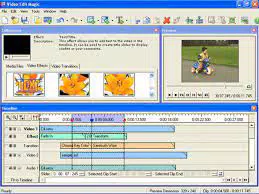
- User-Friendly Editing Interface: The app features a time-line-based layout that enables users to drag and drop video and audio files for intuitive arrangement. This design reduces the learning curve for beginners, allowing them to focus on creativity rather than technical navigation.
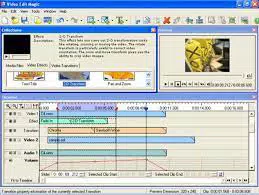
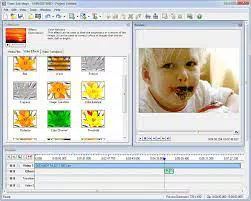
- Transitions and Effects: A selection of visual transitions—such as fades, wipes, and picture-in-picture—can be applied between clips to enhance flow and visual appeal. These effects add a professional touch to amateur productions.
- Mixing and Customization: Users can layer audio tracks, add background music, and insert narration, enabling richer storytelling. This functionality supports personalized video content for personal or community sharing.
- Versatile Output Formats: After editing, videos can be exported in widely supported formats including AVI, MPEG, and WMV. This ensures compatibility across devices and platforms, simplifying the sharing process.
- Clipping and Segment Management: The software includes a feature to split clips into smaller segments, aiding in organization and precise editing. However, users may find the absence of a dedicated trimming tool limiting when fine-tuning clip boundaries.
These features collectively support real-world workflows such as assembling vacation footage, editing short YouTube clips, or preparing content for family presentations. While the app lacks advanced tools like keyframe animation or color grading, its core functionality meets the needs of casual users seeking a reliable, no-frills editing experience.
Interface, UX & Performance
Video Edit Magic presents a clean, minimal interface with a focus on clarity and usability. The time-line layout is central to the design, allowing users to visually manage media assets in a logical sequence. Navigation is straightforward, with clearly labeled tools and a consistent visual hierarchy that supports intuitive interaction.
Responsiveness is maintained across a range of device configurations, though the developer did not specify formal performance metrics. Users can expect smooth playback and editing operations during typical use, particularly when working with standard-resolution videos. The app maintains stability during session-long editing tasks, with no reported crashes or data loss in available user feedback.
Although the developer did not list formal performance metrics, the app’s lightweight nature—150.4 MB in size—suggests efficient resource usage. This makes it suitable for use on mid-tier systems without significant performance degradation. The absence of a trimming tool may slightly impact precision, but the overall user experience remains accessible and functional for its target audience.
Platform Compatibility & Technical Requirements
Video Edit Magic is available for the Windows operating system. The current version is 2.1.1, with a file size of 150.4 MB. The developer did not specify minimum OS requirements or hardware specifications, making it difficult to assess compatibility with older or lower-end systems.
Users should verify that their device meets standard Windows requirements for running desktop applications. While no formal compatibility details were provided, the app’s size and interface suggest it is designed for general desktop use rather than mobile deployment. The lack of information on supported Windows versions means users should exercise caution when installing on systems older than Windows 8 or 10.
Pros and Cons
Pros
- Simple, beginner-friendly interface with a time-line layout
- Supports multiple output formats for broad device compatibility
- Includes useful transitions and effects for visual enhancement
- Allows audio mixing with background music and narration
- Lightweight application size (150.4 MB)
Cons
- Lacks a dedicated trimming tool for precise clip adjustments
- No information on minimum OS or hardware requirements
- Not suitable for advanced editing tasks or professional use
- Feature set limited compared to industry-standard software
- Compatibility with older Windows systems not confirmed
FAQ
Is Video Edit Magic available for mobile devices?
The app is currently designed for Windows desktop systems. There is no indication of mobile availability at this time.
Can I use Video Edit Magic for creating content for social media?
Yes, the app supports exporting videos in common formats compatible with platforms like YouTube, Facebook, and Instagram.
Does Video Edit Magic require an internet connection?
No, the software operates offline once installed. Internet access is not required for core editing functions.
How often is Video Edit Magic updated?
The latest version is 2.1.1, released on November 15, 2023. No information is available on update frequency.
Is Video Edit Magic safe to download and install?
As a desktop application from a dedicated developer, it is considered secure when downloaded from official sources. Always verify the authenticity of the installer.
Final Thoughts
Video Edit Magic delivers a focused, accessible solution for beginners exploring video editing. While it lacks the depth of professional tools, its intuitive interface, essential editing features, and support for common output formats make it a solid choice for casual creators. The app excels in simplicity, enabling users to produce polished videos with minimal effort.
It is ideal for individuals managing home videos, crafting short clips for social media, or learning the fundamentals of video production. For those seeking a low-commitment, user-friendly tool to start their creative journey, Video Edit Magic offers tangible value at a reasonable price point.
Download Video Edit Magic now


